PDF tools
AlgoOCR by Algoza Solutions is an advanced AI-powered document conversion SaaS designed to transform scanned PDFs and images into editable Word and Excel files. Its primary purpose is to accurately rebuild document structure, including tables, headings, and layout, for Hindi, Marathi, and English documents. This tool targets professionals, businesses, and individuals who frequently deal with scanned documents and require structured, editable output without extensive manual cleanup. Key Features AI-Powered Structural Rebuilding: Goes beyond basic OCR to intelligently recognize and reconstruct tables, headings, lists, and paragraphs, preserving the original layout. Multilingual OCR Support: Accurately processes Hindi (Devanagari), Marathi (Devanagari), and English documents, including multilingual content. Editable Output Formats: Converts scanned documents into fully editable Word (.docx) and structured Excel (.xlsx) files. Integrated Translation: Offers automatic translation of output between Hindi, Marathi, and English. Web-Based & Secure: No software installation required; accessible from any device with a browser. Documents are processed securely over HTTPS and automatically deleted after conversion. Significant Time Savings: Reduces manual cleanup time from 20-30 minutes per page to just minor corrections. Use Cases AlgoOCR is invaluable for organizations and individuals handling a high volume of scanned documents such as government forms, invoices, legal contracts, and reports. It eliminates the tedious and time-consuming process of manually retyping or restructuring data from scanned images. For instance, a business can quickly convert scanned invoices into an editable Excel spreadsheet for data analysis, or a legal professional can transform a scanned contract into a Word document for easy editing and review, even if it's in Hindi or Marathi. Furthermore, its ability to preserve complex layouts and tables makes it ideal for converting historical records, academic papers, or any document where structural integrity is paramount. The integrated translation feature also streamlines workflows for international businesses or those operating in multilingual regions, allowing for seamless conversion and translation of documents between Hindi, Marathi, and English. Pricing Information AlgoOCR operates on a freemium model, offering a free 1-page demo without requiring a credit card. For continued use, prepaid packs are available, starting at just ₹19 for 3 pages. These packs are one-time purchases, valid for one year, with no recurring subscription fees, providing a flexible and cost-effective solution for various conversion needs. User Experience and Support The platform boasts a straightforward, three-step process: upload, AI processing, and download, ensuring a minimal learning curve. Its web-based interface is accessible from any device, including computers, tablets, and phones. For assistance, users can reach out via email at info@algozasolutions.com or by phone at +91 82374 39144, with typical responses within 24 business hours. Technical Details AlgoOCR leverages advanced AI and machine learning technologies to perform intelligent document analysis, enabling it to understand and rebuild document structures rather than just extracting raw text. The entire process is handled on secure, cloud-based servers, ensuring high performance and data privacy. Pros and Cons Pros: Superior structural preservation compared to typical OCR tools. Excellent support for Hindi and Marathi Devanagari scripts. Converts to editable Word and Excel formats. Web-based, no installation, accessible anywhere. Significant reduction in manual cleanup time. Secure and private document handling. Cons: Accuracy may vary based on original document quality and language. Complex layouts might still require minor manual corrections. No free tier beyond the initial 1-page demo. Conclusion AlgoOCR stands out as a powerful and efficient solution for converting scanned documents into structured, editable files, particularly for Hindi, Marathi, and English content. By intelligently rebuilding document layouts, it offers substantial time savings and improved productivity for professionals. Explore the demo today to experience the difference AlgoOCR can make in your document workflows.
PDF Reader is a fast, lightweight, and 100% offline PDF tool designed for complete document privacy and control. It provides every essential PDF utility in one intuitive application, ensuring your files remain securely on your device without any cloud uploads, accounts, or tracking. This powerful productivity solution is ideal for individuals and professionals who require robust PDF editing, signing, scanning, and conversion capabilities while prioritizing data security and independence from internet connectivity. Key Features 100% Offline & Private: No cloud uploads, accounts, or tracking; all operations on-device. Comprehensive Editing: Directly edit PDF content, reorder, rotate, delete pages, merge multiple PDFs, and split documents. Secure Signatures: Draw handwritten signatures or add secure digital signatures to contracts and forms. Text-to-Speech (TTS): Listen to documents hands-free with multi-language voice support. OCR Text Recognition: Extract editable and searchable text from scanned PDFs and images. Versatile Conversion: Convert images to PDF, PDF to JPG/PNG, and insert images into PDFs. Use Cases Professionals can efficiently manage contracts, forms, and reports, signing documents digitally and converting formats without internet dependency. It's indispensable for fieldwork or environments with unreliable internet access, ensuring continuous productivity and data integrity. Students can annotate study materials, highlight key information, listen to lectures, and organize research papers securely, leveraging OCR to digitize notes or extract text from scanned articles. For anyone concerned about data privacy, PDF Reader is invaluable, as all operations occur on-device, ensuring sensitive information never leaves their control. It's the go-to solution for robust PDF functionality without compromising security, making it perfect for secure document management in any scenario. Pricing Information PDF Reader operates on a straightforward, privacy-focused model with no subscriptions or recurring fees. While specific pricing details are not provided, the emphasis on "no subscription" suggests a one-time purchase for full access to its comprehensive suite of features, offering a cost-effective solution for long-term use. User Experience and Support The application delivers a fast and smooth user experience, handling even large PDF files without lag or loading screens. It offers a presentation mode for focused reading, supports both horizontal and vertical scrolling, and provides 20 interface languages with over 100 PDF viewing languages. User support and feedback are actively managed via email at devsoftwaremail@gmail.com, with developers committed to continuous improvement based on user input. Technical Details Designed as a lightweight mobile application, PDF Reader is optimized for performance and memory usage, targeting SDK 36 for improved compatibility across modern Android devices. Its core design philosophy centers around 100% offline functionality, ensuring all processing, editing, and conversion tasks are executed directly on the user's device, enhancing both speed and security. Pros and Cons Pros: Unmatched privacy with 100% offline operation and no data sharing. Extensive suite of PDF editing, signing, scanning, and conversion tools. Integrated Text-to-Speech and OCR capabilities. Fast, smooth performance even with large files. No subscriptions or recurring costs. Multilingual interface and document viewing support. Cons: Primarily a mobile application, no explicit mention of desktop versions. Lacks cloud-based collaboration features inherent to its offline design. Specific one-time purchase price not detailed in the provided information. No free trial or freemium option explicitly mentioned. Conclusion PDF Reader stands out as a robust and highly secure solution for all your PDF management needs. By offering a comprehensive toolkit entirely offline, it delivers unparalleled privacy and control over your documents. For anyone seeking a powerful, fast, and secure PDF editor that respects your data, PDF Reader is an essential download. Take back full control of your documents today.
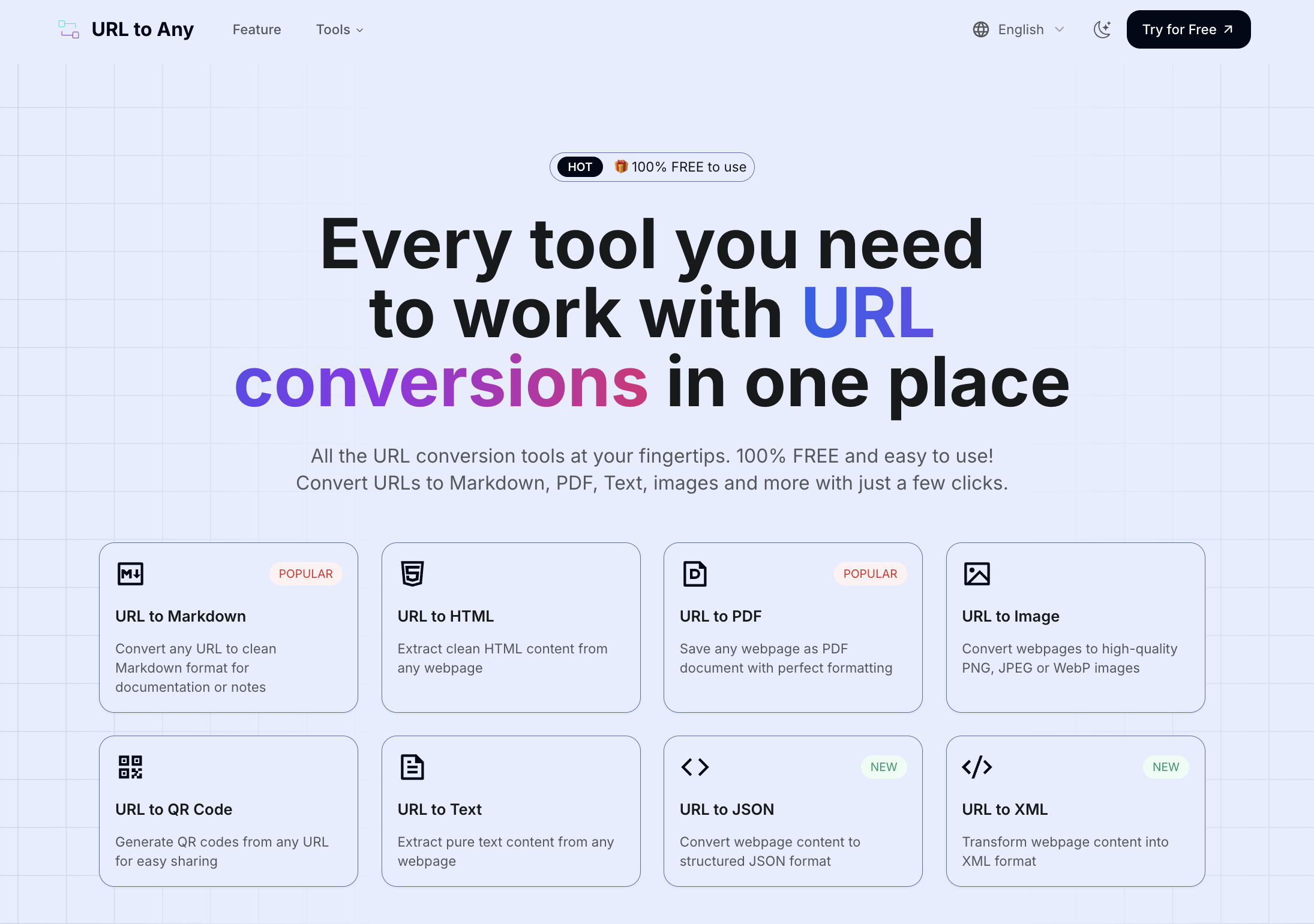
URL to Any: Your Free, All-in-One Web Content Conversion HubURL to Any is a powerful, 100% free online platform offering a comprehensive suite of tools for converting web content into various formats. It caters to anyone needing to save, share, or reference web pages efficiently, from content creators and researchers to developers and everyday users.Key FeaturesExtensive Conversion Options: Transform URLs into Markdown, PDF, HTML, Images (PNG, JPEG, WebP), Text, JSON, XML, and even MP3.Advanced URL Utilities: Includes URL Encoding/Decoding (8+ formats), a URL Extractor, URL Opener, and a QR Code Generator.AI-Powered Insights: Features an AI Summarizer for instant webpage content summaries.SEO and Data Analysis Tools: Extract and analyze URL Meta Tags and Headings, and resolve URLs to IP addresses.Browser Extension for Quick Access: Seamlessly integrate conversion tools into your browsing workflow.Use CasesContent creators and researchers can leverage URL to Any to effortlessly convert articles into Markdown for documentation or PDF for offline reading, ensuring perfect formatting. Developers will find immense value in extracting clean HTML, JSON, or XML for data processing, or utilizing the URL Extractor to efficiently gather links from a website. This streamlines data collection and content repurposing.Marketing professionals can quickly generate QR codes for campaigns, analyze meta tags for SEO optimization, or summarize lengthy web content with the AI Summarizer for quick insights. Everyday users benefit from rapid conversions to images for easy sharing on social media, or pure text for distraction-free reading, significantly improving their digital workflow and productivity.Pricing InformationURL to Any is proudly 100% FREE to use, with no hidden fees, subscriptions, or premium tiers. This commitment ensures that powerful web content conversion tools are accessible to everyone without any financial barriers.User Experience and SupportThe platform boasts a simple, intuitive design, making web content conversion effortless and accessible to all skill levels. It offers instant processing, delivering converted content in seconds, highlighting its optimized engine. While detailed support documentation isn't explicitly listed, the FAQ section addresses common queries, and users can contact the team via email or social media for further assistance, underscoring its user-friendly approach.Technical DetailsURL to Any operates entirely through secure cloud processing, eliminating the need for any software installation. This ensures that all conversions happen off-device, maintaining user privacy by never storing the content of converted webpages or personal information on their servers. The service is fully responsive, guaranteeing seamless functionality across any device with a web browser, including smartphones and tablets.Pros and ConsPros:Completely 100% Free to use.Extensive suite of URL conversion and utility tools.Intuitive and easy-to-use interface.Lightning-fast processing and clean output.Secure and private; data is never stored.Cons:Cannot convert content behind logins or paywalls.May have limitations for extremely large or complex webpages.Specific programming languages/frameworks not detailed.ConclusionURL to Any stands out as an invaluable, free resource for anyone seeking versatile and efficient URL conversion capabilities. Its combination of speed, security, and a wide array of tools makes it an essential addition to any digital toolkit for content management and productivity. Explore URL to Any today to effortlessly streamline your web content conversion workflows.